Architecture for Secure Information Sharing
Protect shared data without relying on system administrators.
Why Traditional Access Control Is Not Enough
Centralized access management has fundamental security limitations
The Problem with Centralized Security Management
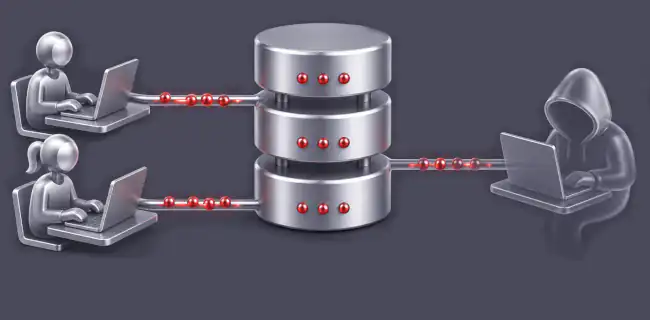
A security model based solely on centralized access control creates a single point of trust. If that trust is compromised by human error, a cyberattack, or abuse of privileged permissions, the security of all protected information may be compromised.
- Miscommunication between data owners and IT administrators can easily grant access to the wrong person.
- A human mistake, malicious insider, or successful attack can expose all confidential information from a single point of control without the knowledge of the data owners.
Access to sensitive information should be enforced technically, not merely administratively. A secure system should ensure that confidential information can only be accessed by its authorized owners and collaborators. If anyone else can technically obtain access, security depends on trusting specific people rather than on the system architecture itself.
Common Approaches to Protecting Sensitive Data
Encrypted Disks
Designed primarily to protect data if a computer is lost or stolen.
Disk encryption is the most common protection available on modern laptops. Many cloud storage providers (such as SharePoint or Proton) also encrypt data stored on their servers. However, disk encryption does not address the most common causes of data leakage and is insufficient for protecting highly sensitive information.
Main Limitations of Disk Encryption
- Most data leaks originate from people inside or close to the team. Encrypting local or network drives provides no protection against this and does not protect against malware running under an authorized user account.
- Server-side disk encryption depends on its implementation. It may protect against physical theft of storage media, but it does not protect against server administrators or privileged IT personnel. The service provider manages both the encryption and the encryption keys, so no additional protection is gained against infrastructure administrators.
- Access to encrypted drives is managed centrally by administrators, who can modify permissions without the knowledge of the data owners. Security therefore depends on people outside the team's control.
Does it solve the problem?
Applications with Built-in Encryption
Many applications encrypt stored data. The important question is where encryption takes place and who controls access to the encryption keys.
Platforms such as Microsoft SharePoint, Google Workspace and many others support encrypted storage, including end-to-end encryption in some scenarios. However, access decisions are still controlled through centralized administration. Their security model relies on correct permission management. AySafe instead relies on cryptography that limits even system administrators.
These applications typically encrypt all content using a common encryption architecture, allowing administrators to grant access simply by changing permissions. As a result, they inherit the limitations described above:
- Administrators can grant access to sensitive information without the knowledge of its owners, including granting access to themselves.
- If an attacker gains administrative privileges, the encrypted data is no longer protected from them.
Note: Advanced encryption features are often available only as premium add-ons and are not widely deployed. In practice, most organizations do not use them.
Digital Rights Management (DRM)
Technology used by large enterprises to protect sensitive corporate documents.
DRM protects documents through classification, access policies, and control over how documents may be distributed both inside and outside the organization.
Large organizations use DRM to manage the complete document lifecycle. It enables server-side processing, workflow automation, and fine-grained access rights depending on both user roles and document status.
DRM itself is not primarily a cryptographic protection mechanism. Security relies on centrally managed policies and administrative controls. Modern DRM systems may also integrate AI-based content analysis to identify sensitive information in unclassified documents.
DRM is complex to deploy and expensive to operate. It does not protect against privileged administrators, and document owners have little control over who can ultimately access their information. For small teams working with confidential information, DRM is usually an impractical solution.
Limitations of DRM for Confidential Team Collaboration
- Not suitable for dynamically changing collaboration groups.
- Security ultimately depends on centrally managed permissions, which can be changed without the knowledge of those responsible for protecting the information.
- Deployment and administration are costly. Because of limited flexibility, users often develop workarounds, especially when collaborating with external partners.
Encrypted Individual Files
A practical solution for protecting email attachments.
Application-level encryption (such as Microsoft Office or PDF password protection) uses strong cryptography and works well for protecting individual documents. However, it is unsuitable for continuous team collaboration.
This approach is intended for situations where a document is transmitted, for example by email, and needs protection while in transit.
Limitations of File Encryption
- Everyone who needs access must know the password, making password sharing unavoidable.
- If many files share the same password, it quickly becomes widely known and provides little real protection. Once compromised, changing the password across all files becomes impractical.
- Users cannot realistically remember different passwords for every document, making fine-grained separation of sensitive information difficult.
Comparison of Methods
| Threat | AySafe | Encrypted Disk | Encrypted Files | DRM | Cloud Platforms with Access Control |
|---|---|---|---|---|---|
| Architecture | |||||
| Security does not rely on trusting the system administrator (Administrator cannot technically read secrets) | YES | NO | YES | NO | NO |
| Who decides access | Vault administrator for each vault | Not applicable | No one, if all files share one password | System administrator | System administrator |
| Who owns the key | Vault administrator (without knowing it) | Operating system / system administrator | Everyone with access knows the password | System administrator | Service provider or organization |
| Protection of structured data | YES, files and structured data | NO, files only | NO, files only | YES, integrated with enterprise systems | YES, files and structured data |
| Multiple protection levels | YES, within the same data | Not applicable | Limited, multiple passwords are impractical | YES | Limited, requires separate workspaces |
| Everyday Team Work | |||||
| Grant access to a new team member | Vault administrator | Does not manage individual users | Anyone who knows the password; one file = all files with the same password | System administrator | System administrator |
| Revoke a team member's access | Immediate by vault administrator | Not applicable | Only by changing all file passwords | Administrator on request (delay risk) | Administrator on request (delay risk) |
| Access history | Audit logs available to administrators | None | None | Audit logs | Audit logs |
| Common Security Threats | |||||
| Administrator cannot grant access to secrets | YES | NO | YES | NO | NO |
| Protection against unauthorized team members | YES, access requires the key | NO, encryption is not user-based | Difficult, passwords must be shared | Depends on system administration | Partial, depends on system administration |
| Compromised login credentials | Device + MFA + second password required | Depends on system access | Change passwords in all files | Depends on identity protection | Depends on identity protection |
| Protection after a server breach | YES | Sometimes, depends on the attack | YES | NO, server can decrypt documents | Only with end-to-end encryption |
| Protection against password sharing | YES, no shared passwords + trusted device + second password | Not applicable | NO, passwords must be shared | YES, passwords are not shared | YES, passwords are not shared + MFA |
| Best Use Cases | |||||
| Independent small teams | YES | YES | NO | NO, limited flexibility | Partial, record-level protection is uncommon |
| Working with external partners | YES | NO, disks cannot be shared | Partial, suitable for single files | NO, restricts external collaboration | Partial, managed by system administrator |
| Suitable for complete BCM | YES, including secrets | NO, availability risk | NO | NO, depends on central administration | NO, central administration and insufficient secret protection |
Notes:
- Cloud platforms with access control: Cloud systems where access is controlled through roles and permissions. Examples include Microsoft SharePoint, Microsoft Teams, ERP systems and other business applications.
- Vault administrator: Each data vault has its own administrator who manages access only to that vault. A team may use any number of independent vaults.
- Second password in AySafe: Access is allowed only from trusted devices. Even then, users must unlock encrypted data and secrets with a second independent password. Access locks automatically after inactivity. Compromising the account password alone is not enough.
- Not applicable (encrypted disks): Disk encryption uses keys unknown to end users and is independent of user accounts. Therefore, user identity management does not affect disk encryption itself.
Combining Security and Collaboration
Strong security and seamless collaboration can coexist
AySafe provides advanced data protection
AySafe removes the trade-off found in conventional systems, where stronger security usually comes at the expense of usability—or vice versa.
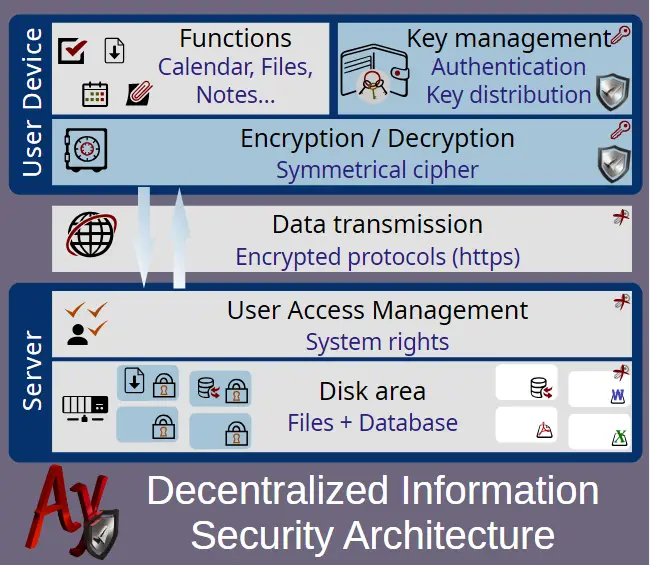
Access to sensitive information is decided by the data owners, and this control cannot be bypassed technically. User and system administration remain centralized without determining who can access confidential information.
AySafe technology provides:
- Decentralized data protection combined with centralized identity and user management.
- Security independent of the system administrator or infrastructure provider.
- Protection that cannot be bypassed by changing system permissions.
- Access decisions made directly by the owners of the data.
- The ability to work with multiple secure data vaults simultaneously without reducing usability or breaking links between related information.
Security is built into everyday teamwork. AySafe is not a standalone vault or password manager but an integrated collaboration and workflow platform. It supports shared files as well as structured business data, including notes, tasks, calendars, project management, requests, issues, risks and many other record types.
Protection for critical secrets
AySafe also provides dedicated protection for system credentials, communication secrets and other highly sensitive information that requires the strongest level of security.
The most sensitive secrets, such as administrator passwords, recovery keys, API keys and credentials for critical infrastructure, are protected using a dedicated security model designed for password storage. They are stored separately from standard documentation and are accessible only to authorized users. At the same time, they remain linked to business processes such as BCM plans.
AySafe combines the collaboration capabilities of modern cloud platforms with a security architecture that does not require trust in system administrators or infrastructure providers.
By separating infrastructure management from the management of confidential information, AySafe enables teams to collaborate securely while retaining full control over access to their sensitive data.